 Polski
 English
 Українська
 Deutsch
 Español
 Türkçe
 Português (BR)
 Français
 Čeština
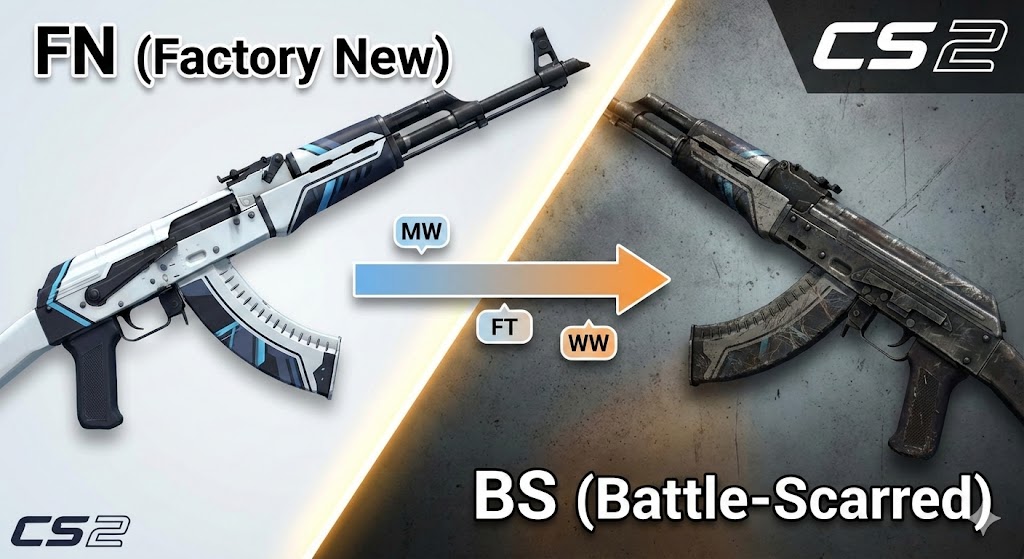

The economy of Counter-Strike 2 is driven by aesthetics, rarity, and specific numerical values known as "Float Values." For new players and seasoned traders alike, understanding the nuances of skin conditions is crucial for making smart investments and building the perfect loadout. Whether you are looking for a pristine AWP or a gritty, battle-hardened AK-47, this guide covers everything you need to know about CS2 skin wear levels.
What Are CS2 Skin Conditions?
In Counter-Strike 2, every weapon skin is assigned a "condition" or "wear level" when it is dropped or unboxed. This condition determines the visual quality of the weapon. Unlike traditional RPGs, the "wear" of a skin never changes. You can use a Factory New skin for thousands of hours, and it will remain Factory New. It does not degrade over time.
The condition is determined by a hidden number called the Float Value, which ranges from 0.00 to 1.00. The game groups these values into five distinct categories.
The 5 Levels of Skin Wear Explained
Here is the breakdown of the five wear levels, ranked from the highest visual quality to the lowest, along with their corresponding float value ranges.
Factory New (FN)
Float Range: 0.00 - 0.07 Factory New is the highest quality condition available. These skins look as though they just came off the production line. In CS2’s Source 2 engine, Factory New skins often benefit the most from the new lighting and reflection systems. They are typically the most expensive versions of a skin due to their rarity and flawless appearance. However, even in FN condition, some skins may still have tiny, barely visible scratches depending on the specific float value (e.g., a 0.069 float vs. a 0.001 float).
Minimal Wear (MW)
Float Range: 0.07 - 0.15 Minimal Wear is often considered the "sweet spot" for traders and players. To the naked eye, a low-float Minimal Wear skin often looks almost identical to a Factory New one but costs significantly less. The imperfections are usually minor—perhaps a small scratch on the magazine or a slight dullness in the paint—but the overall aesthetic remains high-quality.
Field-Tested (FT)
Float Range: 0.15 - 0.38 Field-Tested is the most common condition found on the Steam Community Market. These skins show clear signs of use. You will notice scratches, faded paint, or darker tones. However, because the float range is quite large (0.15 to 0.38), a "low-float" Field-Tested skin (e.g., 0.16) can look like Minimal Wear, while a "high-float" one (e.g., 0.35) will look closer to Well-Worn. This creates excellent opportunities for savvy buyers to find good-looking skins at budget prices.
Well-Worn (WW)
Float Range: 0.38 - 0.45 Well-Worn skins are often the least desirable category for general trading. They have significant scratches or discoloration but often lack the "cult status" of extremely high-float Battle-Scarred skins. They serve as a budget option, but many players prefer to spend slightly more for Field-Tested or save money by going Battle-Scarred.
Battle-Scarred (BS)
Float Range: 0.45 - 1.00 Battle-Scarred skins have the most visual damage. Depending on the skin finish style, this can mean the paint is almost entirely scraped off, or the skin has become very dark and rusty. Interestingly, there is a niche market for "High Float" Battle-Scarred skins. Some skins, like the AWP Asiimov (which becomes the "Blackiimov" when the scope is fully black due to high wear), can actually be worth more than their Field-Tested counterparts due to their unique, destroyed look.
How Wear Affects Appearance: Scratches vs. Patina
Not all skins degrade in the same way. In CS2, the visual wear depends on the finish style of the weapon. There are generally two behaviors you need to be aware of:
1. Paint Abrasion (Scratches)
Most skins follow this rule (e.g., the Vulcan, Asiimov, or Cyrex families). As the float value increases, the paint literally chips off.
-
Factory New: Perfect paint coverage.
-
Battle-Scarred: Large chunks of the weapon's default metal are visible through the paint.
2. Patina and Brightness (Darkening)
Some skins do not scratch; instead, they change color or brightness. This is common with "Gunsmith" or "Patina" finishes (e.g., The Empress, Blue Steel, Medusa, or Printstream).
-
Factory New: Bright, vibrant, and shiny.
-
Battle-Scarred: The design is still intact (no missing paint), but the colors are significantly darker, duller, or appear rusty/oxidized. In CS2, this is vital to remember because the new lighting engine makes the difference in brightness much more noticeable than in CS:GO.
Understanding Float Caps
It is important to note that not every skin exists in every condition. Some skins have "Float Caps" determined by the skin creator. For example, the AWP | Asiimov has a float range capped at 0.18 - 1.00. This means:
-
There is no Factory New AWP Asiimov.
-
There is no Minimal Wear AWP Asiimov. The best condition you can get is Field-Tested. Always check the specific float range of a skin before searching for a condition that might not exist.
Tips for Buying CS2 Skins
When shopping for skins on the Steam Market or third-party sites, do not rely solely on the condition label (e.g., "Field-Tested"). Follow these steps to get the best value:
-
Inspect In-Game: CS2 renders skins differently than the static preview images. Always inspect the server-side link to see how the lighting interacts with the wear.
-
Check the Exact Float: A Field-Tested skin with a 0.15 float is mathematically and visually superior to one with a 0.36 float, yet they may be listed for the same price.
-
Look for Sticker Placement: Sometimes wear can obscure stickers, or conversely, stickers can be used to hide a bad scratch on a specific part of the weapon.
Understanding the mechanics of Factory New vs. Battle-Scarred and the underlying float values will prevent you from overpaying and help you build an inventory that looks better than its price tag suggests.